Case study /02 · Concept · in development
Phandor
Context
Knowledge workers lose hours to workflows that are too irregular for classic macros but too repetitive for humans: filing, transferring, reformatting, cross-checking. Agentic AI can bridge that gap, but trust is the actual product.
Problem
Naive desktop agents fail in two directions — too timid to be useful, or too autonomous to be safe. Phandor's design problem is the boundary: what the agent does freely, what it proposes, and what it must never touch.
Constraints
- Every irreversible action requires explicit human approval — no exceptions by design.
- The agent's context understanding must be inspectable: users see what it thinks it is doing.
- Workflows must be interruptible and resumable at any step.
- Safety boundaries are enforced by the execution engine, not by prompt instructions.
Responsibilities
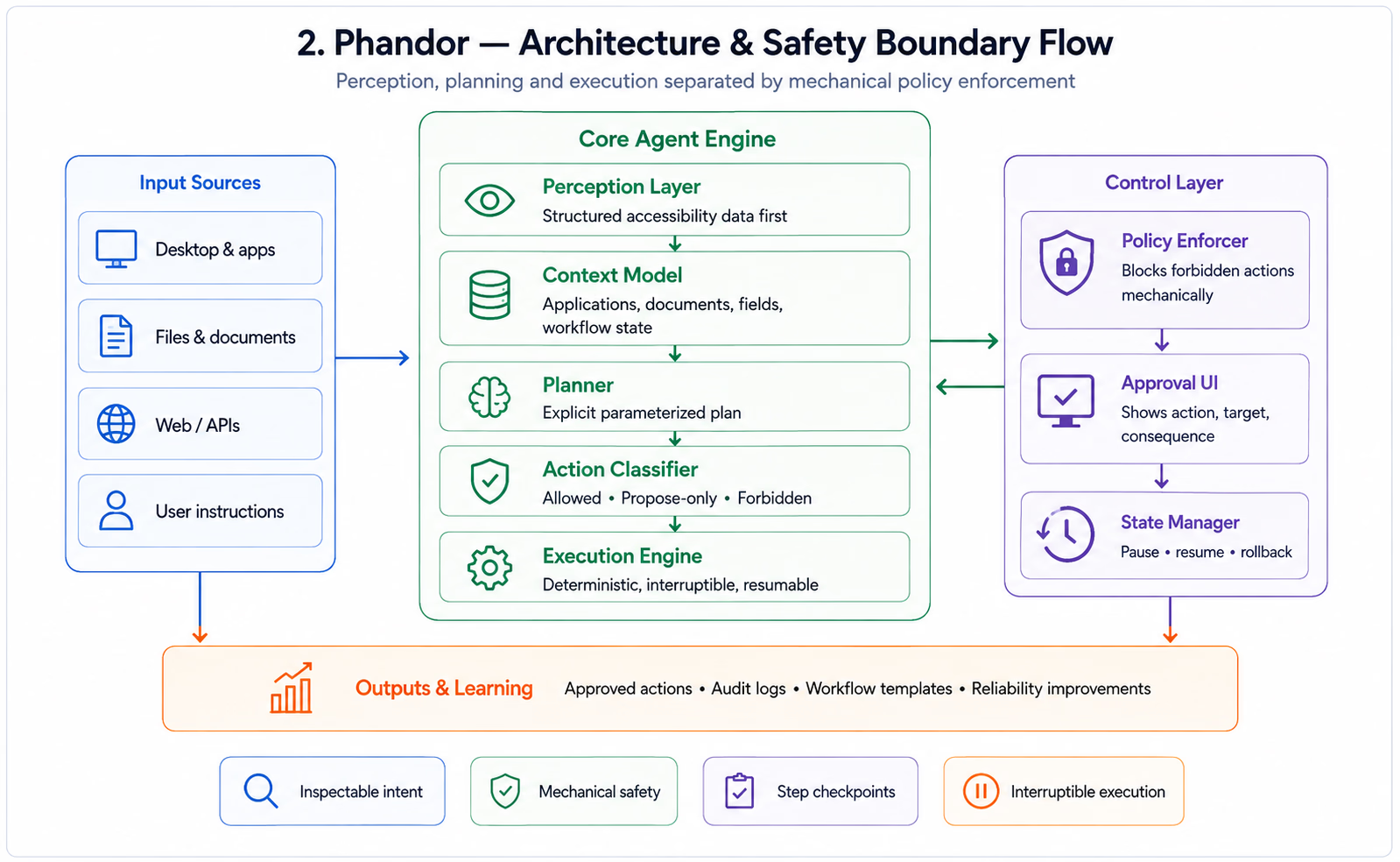
- Agent architecture: perception, planning and execution separation.
- Workflow execution engine with step-level checkpoints.
- Human approval interaction model and its interface.
- Safety boundary system defining allowed, propose-only and forbidden action classes.
- Context understanding across applications and documents.
Architecture
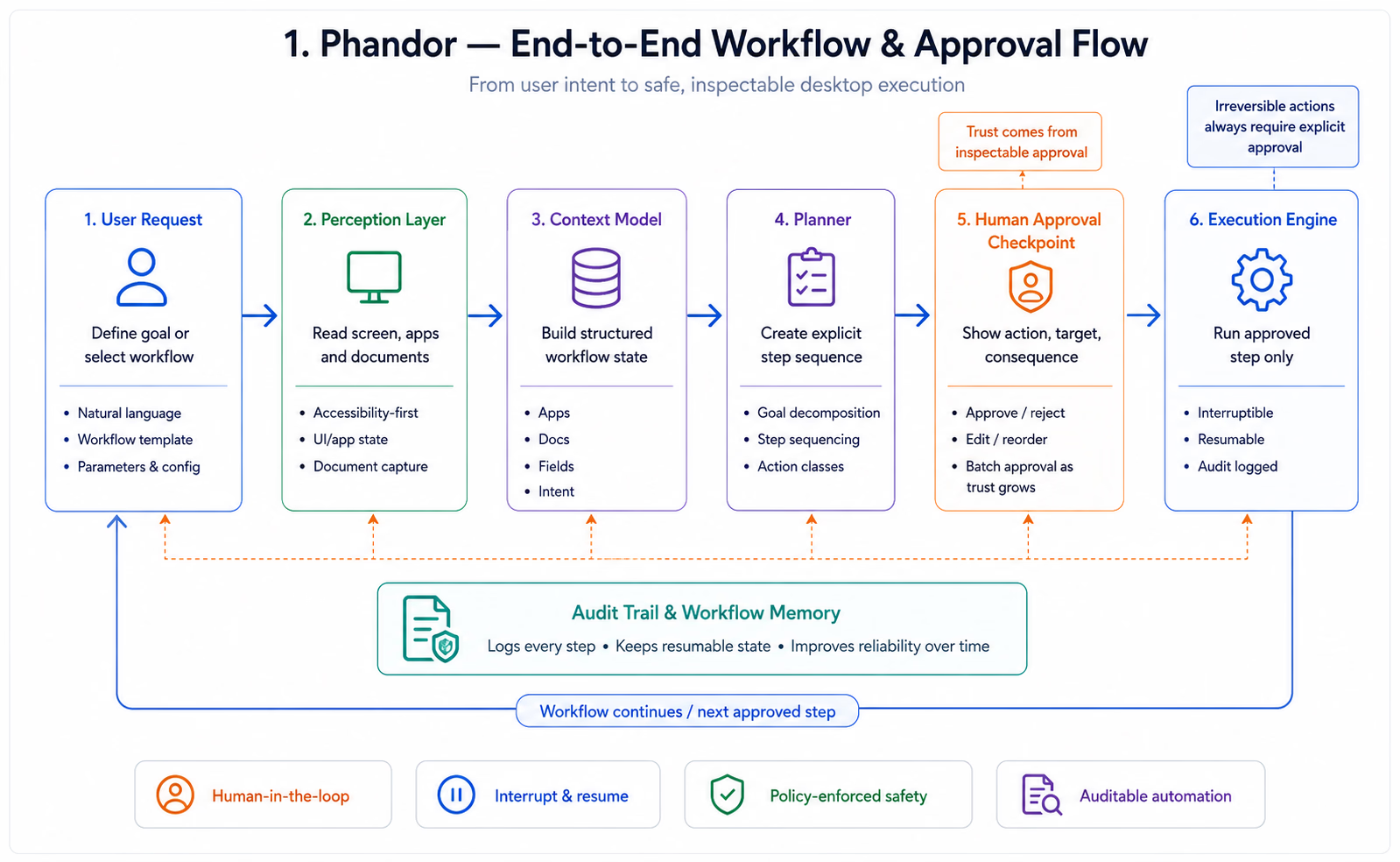
- A perception layer builds a structured model of screen and application state; the planner reasons over that model, never over raw pixels alone.
- Plans compile into explicit step sequences; each step declares its action class before execution.
- The execution engine enforces action-class policy mechanically — forbidden classes cannot execute regardless of what the model outputs.
- Approval checkpoints render the pending action, its target and its consequence in plain language.
Key decisions
- Policy in the engine, not the prompt: safety that depends on model obedience is not safety.
- Plans are shown before they run — users approve intent, then supervise execution.
- Prefer many small approvals early, earning batch approvals as trust in a workflow accumulates.
- Every action is logged with its plan step, so a workflow is auditable after the fact.
Implementation
- Workflow definitions capture recurring tasks as parameterized plans the agent adapts per run.
- The approval UI is optimized for glance-speed decisions: action, target, consequence, approve/reject.
- Interruption is first-class — pausing mid-workflow leaves a resumable, inspectable state.
- Context models persist per workflow, improving step reliability run over run.
Performance
- Perception favors structured accessibility data over vision where available — faster and more reliable.
- Plan compilation front-loads reasoning so execution steps stay fast and deterministic.
Outcomes
- A working concept demonstrating supervised end-to-end workflow execution.
- The action-class safety model held up against adversarial prompt testing in development.
- [PLACEHOLDER — replace with pilot results when the concept reaches user testing.]
Lessons
- In agentic products, the approval interaction is the product — automation is the implementation detail.
- Mechanical enforcement beats behavioral alignment for hard safety boundaries.
- Users trust agents whose reasoning they can inspect, interrupt and override.
Software Architecture